
Transform your computer lab into an AI-powered Language Laboratory
Interactivity, control, and now AI. All in one easy, intuitive tool for teachers and students, with no additional cabling required.
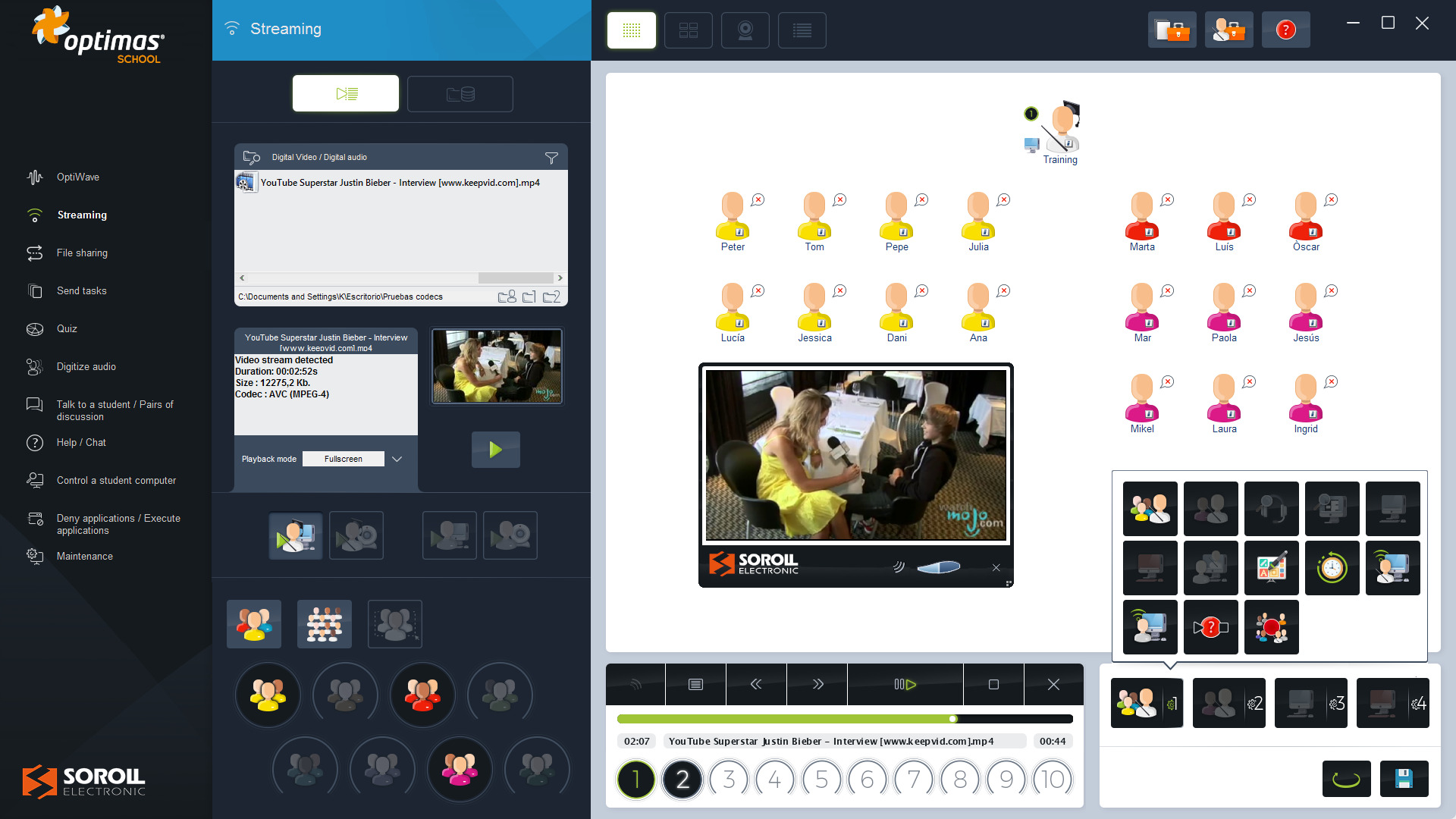
With OPTIMAS School, transform your computer lab into the most modern language laboratory. Real-time audio and video, plus interactive oral communication between teacher and students, allowing the creation of countless group, pair, or autonomous activities.
What is Optimas School?
Easy installation with no additional cabling: it uses only the existing computer network and requires no prior technical knowledge.
4 Systems in 1

Audiovisual Broadcasting
It broadcasts audio and video signals in real-time, up to ten simultaneous channels
Real-time and high-quality audio and/or video signal broadcasts, using solely the classroom computer network. Up to ten simultaneous broadcast channels can be configured, through which the teacher can send different audiovisual resources to different groups of students. The emitted signals can come from both analogue and digital sources.

Oral Communication
Creating work and conversation groups allows interaction between teachers and students.
Oral communication between students and the teacher is essential for working on oral expression and comprehension. Up to eight simultaneous work groups can be created, as well as conversation pairs, whether consecutive or random. Students interact through their microphones and the teacher can listen to them, talk to them, or enable the help system.

Management
Manage the classroom in a personalized way, identify students, and get overviews.
Incorporation of different tools for the teacher to manage and administer the classroom dynamically and individually. They can request student names and view them on their monitor, and choose how they want to get an overview of the classroom. Teachers can access custom profiles to store classroom settings.

Control
Control the student’s screens, listen, record their interventions, and control remotely.
Higher levels of discipline as the teacher has total control of what is happening in the class. They can see the screens of the students, as well as listen to them and record their output. With remote control, they can turn on and off student computers, lock them, run programs automatically or deny applications.
The next-generation recorder-player... now powered by AI
Integrated into the Optimas software, the DLL (Digital Language Laboratory) tool allows the creation of interactive multimedia projects based on listening, speaking, reading, and writing. Teachers can design their own materials (audio, video with subtitles, and webcam) and share them in real time with maximum quality.
New AI feature for pronunciation improvement
Dual transcription
Automated text from both the original audio and the student's own recording.
Error detection
Precise identification of mispronounced words.
Detailed feedback
Specific AI-generated recommendations to improve phonetics.
100% Private and Local
Built-in AI-assisted analysis that requires no internet connection or additional subscriptions.
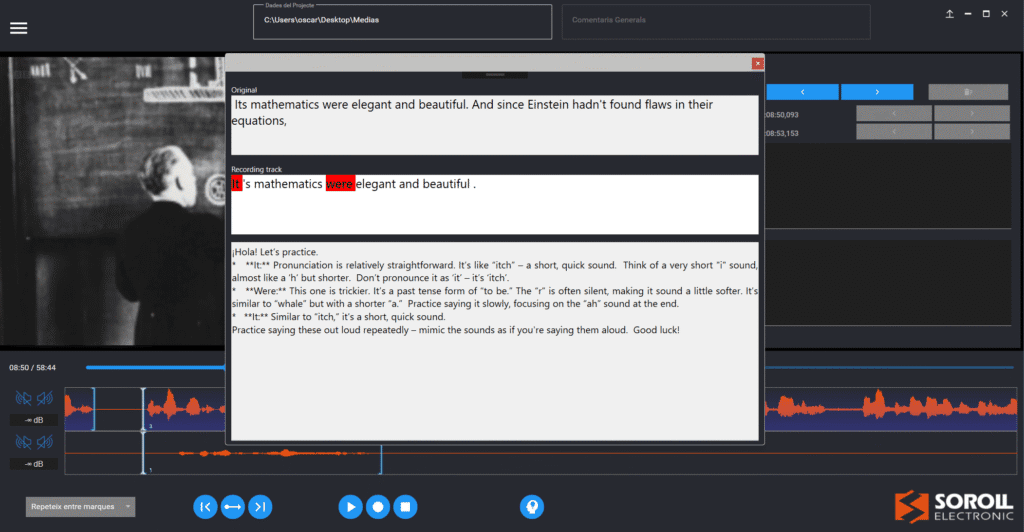
- AI-assisted pronunciation analysis with automated feedback (no internet usage required).
- Advanced wave graphics to visually compare the similarity between the student’s voice and the “Master” track.
- Simultaneous or alternating “Master” and “Student” tracks for guided and autonomous learning.
- Full multimedia support, video subtitling feature, and exam mode to automatically collect assessments.

Advanced Features
Digital Recorder-Player
DLL, integrated in Optimas, offers full functionality.
Interactive multimedia projects
Allows the creation of multimedia projects to enhance listening, speaking, reading, and writing skills.
Learning flexibility
Option of guided work, exam mode, or self-paced and self-directed learning.
Use of Audio and Video Streams
Access to a variety of content such as songs, speeches, music clips, and movies, among others.
Customized design
Teachers can create their own materials and exercises to turn classes into unique, fun and motivating learning experiences.
Equipment

Optimas Premium
Desktop communication equipment with touch buttons, high-quality amplifier, and auxiliary USB port.
El equipo de comunicación del alumno tiene el formato de placa que puede atornillarse o encastrarse sobre el mobiliario, con botones táctiles para el volumen y puerto USB auxiliar para la interconexión de otros dispositivos externos.

Optimas University
In addition to the premium equipment features, advanced interpretation tools are available.
El equipo de comunicación incorpora, además, botones que permiten automatizar funciones según la actividad que se está realizando y dispone de utilidades avanzadas para el aprendizaje de idiomas, así como funciones de traducción e interpretación.

Optimas Portable
A portable format that integrates with all types of computers and laptops and allows its reuse in different classrooms.
Formato portátil de Optimas School que permite la reutilización del equipamiento en distintas aulas gracias a la integración del equipo de comunicación en un pendrive. Facilita la interconexión con cualquier tipo de ordenadores, incluso ordenadores portátiles.
Optional Modules
Evaluation Mode
Program exercises and tests with tracking tools and statistics.
Multiple Recording Mode
Automatic recording of all class activities for oral exams and follow-up.


Do you want to learn more?

The ETESDA Upgrades its Language Classroom with Optimas tool
Soroll Electrònic has updated the language classroom of the Spanish Security and Defence Centre (ETESDA) at the Zaragoza Air Base in Spain.

The University of Castellón Maintains its Language Laboratories with Soroll Electrònic
The Universitat Jaume I (UJI) of Castellón has a ten-year contract with Soroll Electrònic for the maintenance of its language laboratories.

The University of Valencia Working with the Optimas System
The Faculty of Philology of the University of Valencia (UV) has installed two language classrooms with the Optimas School system of Soroll Electrònic.